What is Discord?
Discord is a platform for voice, text, and video communication, organized around servers and channels. Users can create communities, chat, join voice conversations, share their screen, and use bots and integrations.
More information: https://discord.com/
Music Master can integrate with Discord through a bot used for streaming audio to a voice channel (for example while playing online).
 Oops!
Oops!This feature is available in the full Windows version of Music Master. It is not available on Android or in the demo version.
Bot installation and usage
Go through the following steps:
- Install the Discord application (https://discord.com/download).
- Install and activate the Music Master application (installation and activation).
- Start the Music Master and Discord applications.
- In the Main Menu, select Integrations -> Discord.
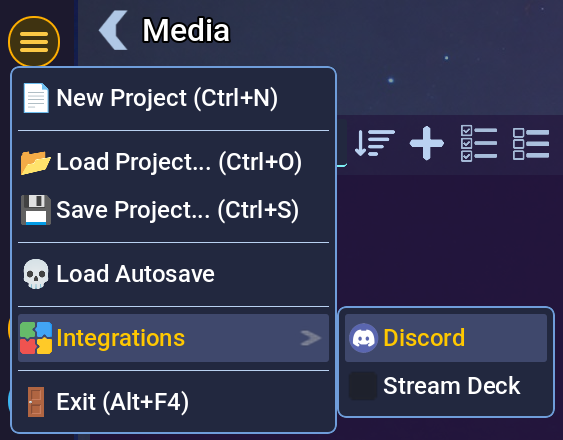
Menu item in the main menu.
- A window with bot options will appear.
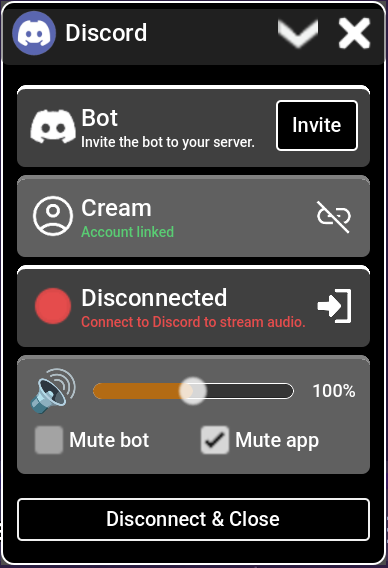
Window with bot options.
- Next, invite the bot to your server using the “Invite” button. A browser window will open, where you can choose the server you want to invite the bot to. After inviting it, the bot should appear on the server.
- The next step is to link the bot with your user account. Click the “Link” 🔗 button, which will open a browser window where you can sign in to your Discord account. The application stores only the username and user ID.
- To connect the bot to a voice channel:
- Join that voice channel in Discord.
- Click the join channel button ➜] in Music Master.
- After a moment, the bot should appear in the same channel.
- From that point on, all audio played in the Music Master application will be audible in the Discord voice channel to all connected users.
Streaming permissions
The server administrator should set the required streaming role. If a role is set, only users with that role will be able to connect to the bot and stream audio to the voice channel.
- Connect the bot with a voice channel (see above).
- In Discord chat, enter the
/setup rolecommand. - Choose the role that will allow using the bot and streaming audio.
Warning!If no role is assigned, any user who has Music Master will be able to use the bot on that server.